11 PCAP文件 - 高级主题
11.1 概述
根据雷达的配置,它可能工作在单播/组播/广播模式下,或者在VLAN环境下,也可能加入用户自己的层。
本文说明了在每种场景下如何设置 ag_driver 的网络配置选项。
设置网络配置选项的前提,是先确定雷达工作在哪种场景,可以参考《根据PCAP文件确定网络配置选项》。
为了清晰,本文所有的图都只列出了 MSOP 端口,DIFOP 端口的配置与 MSOP 类似。
11.2 一般场景
这里的配置代码适用于如下的场景。
广播/组播/单播模式;
PCAP 文件中有多个雷达的数据,只想从中解码其中一个雷达的点云。
AGDriverParam param;                      // Create a parameter object
param.input_type = InputType::PCAP_FILE;  // get packet from online lidar
param.input_param.pcap_path = "/home/asensing/lidar.pcap";  // Set the pcap file path
param.input_param.msop_port = 51180;      // Set the lidar msop port number, the default is 51180
param.input_param.difop_port = 7788;      // Set the lidar difop port number, the default is 7788
param.lidar_type = LidarType::A0;         // Set the lidar type.
一个 ag_driver 不支持的例外是:
PCAP 文件中有多个雷达的数据,它们的目的 IP 不同,但目的端口相同。这种情况 ag_driver 是不支持的。
11.3 VLAN
有些场景下,雷达工作在 VLAN 环境下。这时 MSOP/DIFOP Packet 带 VLAN 层,如下图。
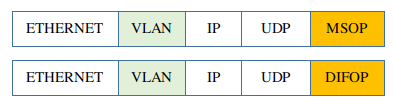
ag_driver 使用 libpcap 库解析 PCAP 文件,可以得到完整的、包括 VLAN 层的 MSOP/DIFOP Packet。
要剥除 VLAN 层,只需要设置 use_vlan=true。
AGDriverParam param;                      // Create a parameter object
param.input_type = InputType::PCAP_FILE;  // get packet from online lidar
param.input_param.pcap_path = "/home/asensing/lidar.pcap";  // Set the pcap file path
param.input_param.msop_port = 51180;      // Set the lidar msop port number, the default is 51180
param.input_param.difop_port = 7788;      // Set the lidar difop port number, the default is 7788
param.input_param.use_vlan = true;        // Whether to use VLAN layer.
param.lidar_type = LidarType::A0;         // Set the lidar type.
11.4 User Layer, Tail Layer
某些场景下,用户可能在 MSOP/DIFOP 数据前后加入自己的层。例如,USER_LAYER 在 MSOP/DIFOP 数据之前,TAIL_LAYER在 MSOP/DIFOP 数据之后。

这些层是 UDP 数据的一部分,所以 ag_driver 可以自己剥除他们。只需要告诉它每个层的字节数就可以。
如下的例子中,指定 USER_LAYER 为 8 字节,TAIL_LAYER 为 4 字节。
AGDriverParam param;                      // Create a parameter object
param.input_type = InputType::PCAP_FILE;  // get packet from online lidar
param.input_param.pcap_path = "/home/asensing/lidar.pcap";  // Set the pcap file path
param.input_param.msop_port = 51180;      // Set the lidar msop port number, the default is 51180
param.input_param.difop_port = 7788;      // Set the lidar difop port number, the default is 7788
param.input_param.user_layer_bytes = 8;   // user layer bytes. there is no user layer if it is 0
param.input_param.tail_layer_bytes = 4;   // tail layer bytes. there is no user layer if it is 0
param.lidar_type = LidarType::A0;         // Set the lidar type.